Welcome to the documentation for my self-hosted homelab project. These files reflect a customized hands-on environment where I deploy and manage a wide variety of hardware and services. Such as a local Kubernetes cluster running Mistral-7B for private AI inference. It also includes core utilities like Pi-hole, TrueNAS, Grafana, Proxmox and OPNsense to support DevOps workflows, network security and infrastructure experimentation.
The following diagram shows the current physical layout of my homelab:
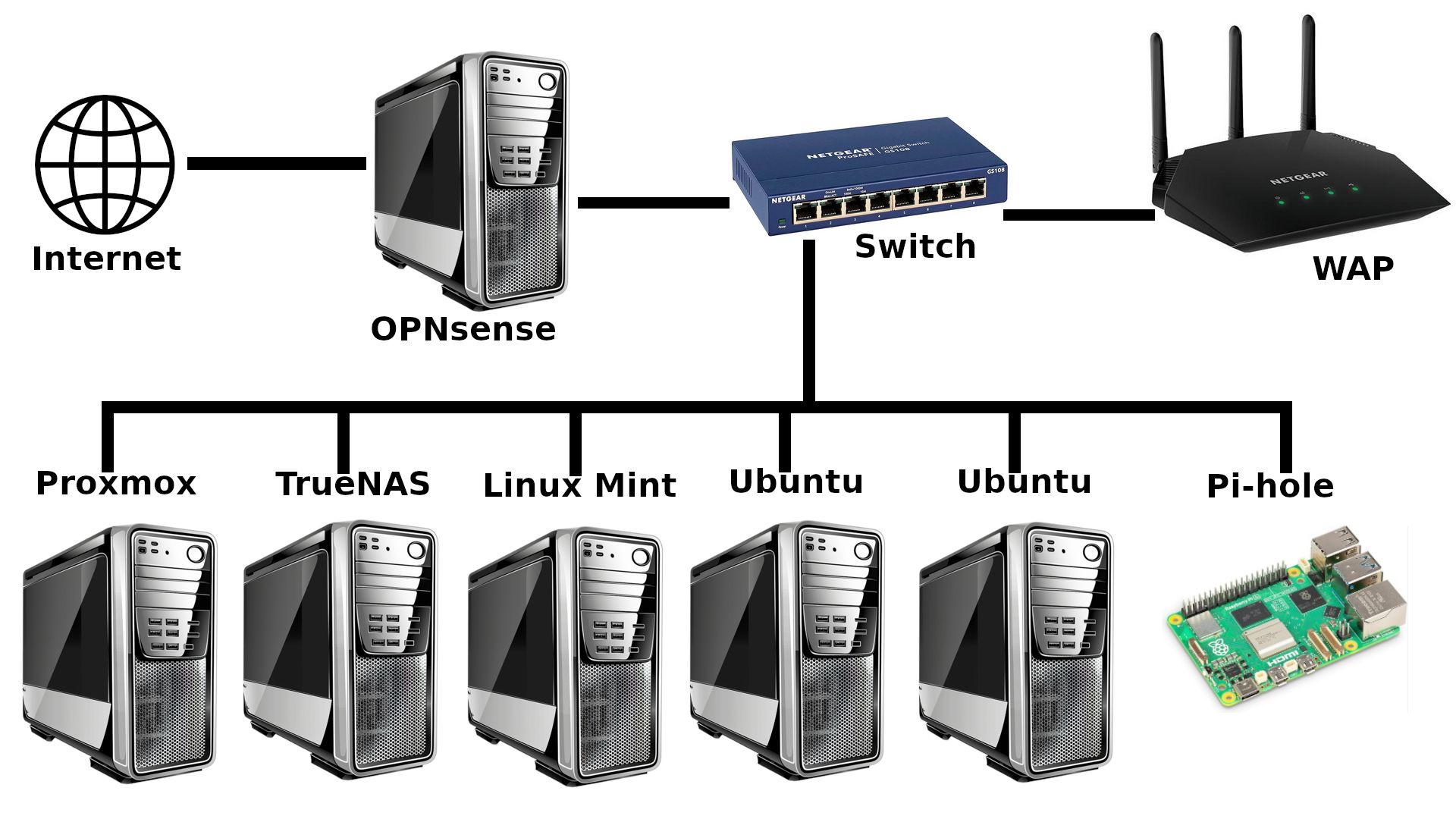
This section outlines the core technologies and domains defining the scope of my homelab. Each tool and service has been chosen to support hands-on learning in areas such as container orchestration, AI deployment, network management and infrastructure automation. Together, they form an environment for experimenting with modern DevOps and self-hosted systems.
-
Containerization And Orchestration: Docker, Kubernetes, Helm
-
AI/ML Inference: Ollama with Mistral-7B, Retrieval-Augmented Generation (RAG)
-
Networking And DNS: OPNsense, Pi-hole
-
Storage And Backups: TrueNAS SCALE, automated rsync backups over SSH with logging
-
Monitoring And Observability: Prometheus, Grafana
-
Security And Access: SSH, VLANs, local-only service exposure
-
Linux Administration: Ubuntu Server, Linux Mint, shell scripting
I am currently focused on refining the Kubernetes setup, with particular attention paid to ensuring high availability and smooth deployment workflows for self-hosted applications. A major priority is improving Ollama’s integration with the Mistral-7B model to enable consistent, low-latency local inference without relying on external APIs or internet connectivity. This includes tuning resource limits, validating engineering choices and verifying model stability across node restarts.
Recent breakthroughs include upgrading the RAM on both homelab LLM nodes to support the memory demands of AI workloads and orchestration tools. I also resolved compatibility issues caused by upgrading to Ubuntu 24, which led to Docker and Kubernetes instability; the cluster now runs reliably on Ubuntu 22 LTS.
Ongoing tasks include familiarizing myself with Prometheus and Grafana monitoring stack to track resource usage and container health, improving logging and alerting mechanisms and documenting infrastructure architecture to support reproducibility. I am also researching and planning near-future automations using tools like n8n.
-
Tinkering with various LLMs via two installations of Ollama on physically separated computers
-
Finalizing a robust, passwordless SSH backup workflow to TrueNAS SCALE with rsync
-
Transitioning my Raspberry Pi 5 to boot and operate entirely from an NVMe drive, enabling faster read/write speeds and better reliability for running services and long-term logging tasks
My homelab serves as a long-term platform for skill development and technical exploration. By building and managing every layer of the stack myself, I am actively working to deepen my understanding of core DevOps practices, infrastructure resilience and the deployment of self-hosted AI systems. The following areas represent key learning goals to guide the direction of this project.
-
Working with the
llama.cppAI runtime for local LLM development -
Mastering Kubernetes and self-hosted LLM deployment workflows
-
Improving infrastructure automation with Ansible and CI pipelines
-
Deepening knowledge of secure networking, ZFS storage, and system observability
-
Building a reliable, reproducible environment for future AI experiments
-
Learning how to build, deploy and orchestrate Infrastructure as Code assets and tools
The following directory layout provides an overview of how this homelab repository is organized. Each folder serves a specific purpose, from Kubernetes manifests and Docker configurations to architecture diagrams and system automation scripts. This structure is designed to keep the project modular, maintainable and easy to extend as the homelab evolves.
/homelab
├── README.md
├── kubernetes/ Cluster manifests and deployment files
├── docker/ Compose files for services
├── scripts/ Automation and backup scripts
├── notes/ Configuration notes and issue logs
Thank you for checking out my homelab documentation project.
This environment serves as a dedicated, immersive space for hands-on experimentation, where I continuously test, break and improve systems to better understand the technologies which power modern infrastructure. From deploying containerized AI models to managing secure networks and automating backups, every component is purposefully selected to support practical learning and long-term growth.
As this homelab evolves, I am documenting not just the technical implementations, but the decisions, challenges and lessons learned along the way. Everything here is open for refinement and I welcome input, questions or collaboration from fellow homelabbers, engineers and anyone curious about building reliable, self-hosted systems from the ground up.