
Warning
EXPERIMENTAL PROJECT: Git-Ape is in active development and is not production-ready. Use it for local development, demos, sandbox subscriptions, and learning only.
📖 Documentation: azure.github.io/git-ape
Git-Ape is a platform engineering framework built on GitHub Copilot. It is a multi-agent system that plans, validates, and deploys Azure infrastructure — with security gates, cost analysis, and CI/CD pipeline integration built in.
Nothing is deployed without your explicit confirmation.
Git-Ape walks every deployment through the same four steps:
- Gather requirements through a guided interview.
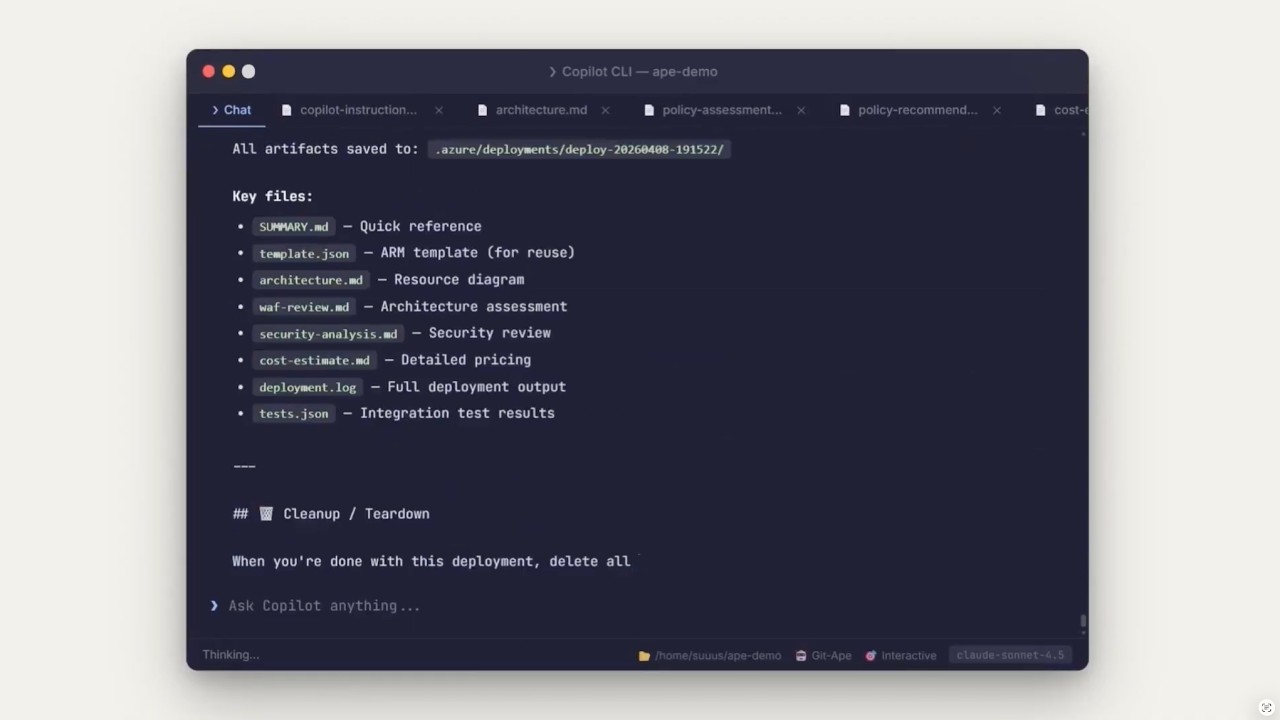
- Generate an ARM template, architecture diagram, cost estimate, and security report.
- Confirm with you (interactive) or via PR review (headless) before anything is created.
- Deploy to Azure and run post-deployment validation.
It is built for:
- Azure application stacks: Function Apps, Web Apps, Storage, SQL, Cosmos DB, Container Apps.
- Repository onboarding: OIDC, RBAC, GitHub environments, and secrets.
- Auditable deployments: every run is saved under
.azure/deployments/. - Drift detection between live Azure state and stored deployment artifacts (agentic workflow — coming soon).
A short demo video of the onboarding and deploy experience using Git-Ape.
- A Bash-compatible shell (use
git-bashon Windows). Other shells are untested. - Azure CLI (
az), GitHub CLI (gh),jq, andgitinstalled and authenticated. - Run
/prereq-checkin Copilot Chat to verify everything is in place.
Git-Ape ships as a VS Code agent plugin and as a GitHub Copilot CLI plugin. Pick the path that matches how you use Copilot.
Prerequisites: VS Code with GitHub Copilot enabled and the chat.plugins.enabled setting set to true (managed at the organization level).
-
Add the marketplace in your VS Code
settings.json: -
Open the Extensions view (
⇧⌘Xon macOS,Ctrl+Shift+Xon Windows/Linux), search for@agentPlugins, find git-ape, and select Install. -
Alternatively, open the Command Palette (
⇧⌘Pon macOS,Ctrl+Shift+Pon Windows/Linux), run Chat: Install Plugin From Source, and enterhttps://github.com/Azure/git-ape. -
Verify the agents and skills appear in Copilot Chat (for example, type
@git-apeor/prereq-check).


copilot plugin marketplace add Azure/git-ape
copilot plugin install git-ape@git-ape
copilot plugin list   # Should show: git-ape@git-ape
/plugin marketplace add https://github.com/Azure/git-ape
/plugin install git-ape@git-ape
/plugin list # Should show: git-ape@git-ape
Clone this repository and register the local checkout as a VS Code plugin in settings.json:
"chat.pluginLocations": {
    "/absolute/path/to/git-ape": true
}
Reload VS Code; the @git-ape agent and Git-Ape skills will appear in Copilot Chat.
- Sign in with
az login. - Configure the Azure MCP server in VS Code — see the Azure Setup guide.
In Copilot Chat, try one of:
@git-ape deploy a Python function app@git-ape deploy a web app with SQL database@Git-Ape Onboarding set up this repo for Azure deployments
When you're done, clean up with:
@git-ape destroy Python function app
- Examples: End-to-end deployment walkthroughs.
- Azure Setup: Azure MCP server configuration for VS Code.
- State Management: How deployment artifacts are stored and reused.
- Onboarding: Repository onboarding, OIDC, RBAC, and GitHub environment setup.
- Codespaces: GitHub Codespaces and dev container setup.
@git-ape is the central orchestrator. It coordinates a pipeline of specialized subagents, enforces security gates, invokes skills, and manages deployment state. It never deploys anything without explicit user confirmation.
%%{init: {'theme':'base','themeVariables':{'fontSize':'13px','lineColor':'#64748b','textColor':'#1e293b','primaryTextColor':'#0f172a','edgeLabelBackground':'#f8fafc','tertiaryColor':'#f1f5f9'}}}%%
graph TD
    GA["<b>@git-ape</b><br/>Main Orchestrator<br/><i>Coordinates stages, enforces gates,<br/>delegates to subagents, invokes skills</i>"]

    GA --> DP
    GA --> AD
    GA --> UT

    subgraph DP ["Deployment Pipeline"]
        RG["<b>Requirements Gatherer</b><br/>Interview user<br/>CAF naming<br/>SKU validation"]
        TG["<b>Template Generator</b><br/>ARM template<br/>Architecture diagram<br/>Cost estimate"]
        SG{{"Security Gate<br/>(BLOCKING)"}}
        WR["WAF Review<br/>(Principal Architect)"]
        UC{{"User Confirmation"}}
        RD["<b>Resource Deployer</b><br/>az deployment<br/>Monitor & retry<br/>Integration tests"]

        RG --> TG --> SG --> WR --> UC --> RD
    end

    subgraph AD ["Advisory"]
        PA["<b>Principal Architect</b><br/>WAF 5-pillar review<br/>Trade-off analysis"]
    end

    subgraph UT ["Utility"]
        IE["<b>IaC Exporter</b><br/>Import live resources"]
        OB["<b>Git-Ape Onboarding</b><br/>OIDC + RBAC<br/>GitHub envs & secrets"]
    end

    classDef orchestrator fill:#1f6feb,stroke:#0b3d91,stroke-width:2px,color:#ffffff
    classDef pipeline fill:#dbeafe,stroke:#1f6feb,stroke-width:1px,color:#0b3d91
    classDef gate fill:#fde68a,stroke:#b45309,stroke-width:2px,color:#7c2d12
    classDef advisory fill:#ede9fe,stroke:#7c3aed,stroke-width:1px,color:#4c1d95
    classDef utility fill:#dcfce7,stroke:#15803d,stroke-width:1px,color:#14532d

    class GA orchestrator
    class RG,TG,RD pipeline
    class SG,UC gate
    class WR,PA advisory
    class IE,OB utility
Skills are invoked by agents at specific stages. Each skill handles one focused task.
| Phase | Skill | Purpose |
|---|---|---|
| Pre-Deploy | /azure-naming-research |
CAF abbreviation lookup, naming constraint validation |
/azure-resource-availability |
SKU restrictions, version support, API compatibility, quota | |
/azure-security-analyzer |
Per-resource security assessment with blocking gate | |
/azure-deployment-preflight |
What-if analysis and permission checks before deploy | |
/azure-role-selector |
Least-privilege RBAC role recommendations | |
/azure-cost-estimator |
Real-time cost estimation via Azure Retail Prices API | |
/prereq-check |
Verify required CLI tools and auth sessions are ready | |
| Post-Deploy | /azure-integration-tester |
Post-deployment health checks and endpoint tests |
/azure-resource-visualizer |
Generate Mermaid diagrams from live Azure resources | |
| Operations | /azure-drift-detector |
Detect config drift between live Azure and stored state |
/git-ape-onboarding |
Guided setup for OIDC, RBAC, environments, and secrets |
%%{init: {'theme':'base','themeVariables':{'fontSize':'13px','lineColor':'#64748b','textColor':'#1e293b','primaryTextColor':'#0f172a','edgeLabelBackground':'#f8fafc','tertiaryColor':'#f1f5f9'}}}%%
graph TD
    U["User prompt:<br/><i>deploy a Python function app</i>"]

    U --> S1

    S1["<b>Stage 1: Requirements</b><br/>Requirements Gatherer interviews user"]
    SK1["/azure-naming-research<br/>/azure-resource-availability"]

    S1 -. skills .-> SK1
    S1 --> S2

    S2["<b>Stage 2: Template & Analysis</b><br/>Template Generator produces ARM +<br/>architecture + cost + security report"]
    SK2["/azure-security-analyzer<br/>/azure-deployment-preflight<br/>/azure-cost-estimator<br/>/azure-role-selector"]

    S2 -. skills .-> SK2
    S2 --> GATE

    GATE{{"Security Gate"}}
    GATE -- "BLOCKED" --> FIX["Fix loop"] --> S2
    GATE -- "PASSED" --> WAF

    WAF["<b>Stage 2.75: WAF Review</b><br/>Principal Architect scores 5 pillars"]
    WAF --> CONFIRM

    CONFIRM{{"User confirms / PR approved"}}
    CONFIRM --> S3

    S3["<b>Stage 3: Deploy</b><br/>Resource Deployer runs az deployment"]
    S3 --> S4

    S4["<b>Stage 4: Validate</b><br/>Health checks, endpoint tests, diagram"]
    SK4["/azure-integration-tester<br/>/azure-resource-visualizer"]

    S4 -. skills .-> SK4

    classDef user fill:#e0e7ff,stroke:#4338ca,stroke-width:2px,color:#1e1b4b
    classDef stage fill:#dbeafe,stroke:#1f6feb,stroke-width:1px,color:#0b3d91
    classDef skill fill:#f1f5f9,stroke:#64748b,stroke-width:1px,color:#0f172a,stroke-dasharray: 4 2
    classDef gate fill:#fde68a,stroke:#b45309,stroke-width:2px,color:#7c2d12
    classDef fix fill:#fecaca,stroke:#b91c1c,stroke-width:1px,color:#7f1d1d
    classDef deploy fill:#dcfce7,stroke:#15803d,stroke-width:2px,color:#14532d

    class U user
    class S1,S2,WAF stage
    class SK1,SK2,SK4 skill
    class GATE,CONFIRM gate
    class FIX fix
    class S3,S4 deploy
Git-Ape runs the same agents and skills in two different contexts.
%%{init: {'theme':'base','themeVariables':{'fontSize':'13px','lineColor':'#64748b','textColor':'#1e293b','primaryTextColor':'#0f172a','edgeLabelBackground':'#f8fafc','tertiaryColor':'#f1f5f9'}}}%%
graph LR
subgraph Interactive ["🧑💻 Interactive Mode — VS Code / Chat"]
direction TB
I1["User ↔ @git-ape"]
I2["Real-time Q&A"]
I3["az login session"]
I4["Interactive confirmation"]
I5["Direct deployment"]
I6["@git-ape destroy {id}"]
end
subgraph Headless ["🤖 Headless Mode — Coding Agent / Actions"]
direction TB
H1["Issue → Agent on branch"]
H2["Parse requirements from body"]
H3["OIDC auth via Actions"]
H4["Commit artifacts to PR"]
H5["git-ape-plan.yml (PR)"]
H6["git-ape-deploy.yml (merge)"]
H7["git-ape-destroy.yml (merge)"]
end
classDef interactive fill:#dbeafe,stroke:#1f6feb,stroke-width:1px,color:#0b3d91
classDef headless fill:#ede9fe,stroke:#7c3aed,stroke-width:1px,color:#4c1d95
class I1,I2,I3,I4,I5,I6 interactive
class H1,H2,H3,H4,H5,H6,H7 headless
Interactive — you talk to @git-ape in VS Code Copilot Chat, authenticate via az login, and approve each step in real time.
Headless — the Copilot Coding Agent picks up a GitHub issue, generates the template on a branch, opens a PR, and the CI/CD workflows (git-ape-plan, git-ape-deploy, git-ape-destroy) handle validation, deployment, and teardown via OIDC.
| Workflow | Trigger | Purpose |
|---|---|---|
git-ape-plan.yml |
PR with template changes | Validate, what-if, post plan as PR comment |
git-ape-deploy.yml |
Merge to main or /deploy comment |
Execute ARM deployment |
git-ape-destroy.yml |
Merge PR with destroy-requested |
Delete resource group |
git-ape-verify.yml |
Manual dispatch | Verify OIDC, RBAC, pipeline health |
Note: Drift detection and TTL-based cleanup were previously handled by scheduled workflows (
git-ape-drift.yml,git-ape-ttl-reaper.yml). These are being replaced by agentic workflows — coming soon.
Git-Ape is packaged as a Copilot CLI plugin with agents and skills under .github/:
plugin.json                          # Plugin manifest
.github/
├── agents/
│   ├── git-ape.agent.md             # Main orchestrator
│   ├── git-ape-onboarding.agent.md  # Onboarding agent
│   ├── azure-requirements-gatherer.agent.md
│   ├── azure-template-generator.agent.md
│   ├── azure-resource-deployer.agent.md
│   ├── azure-principal-architect.agent.md
│   └── azure-iac-exporter.agent.md
├── skills/
│   ├── git-ape-onboarding/          # OIDC, RBAC, env setup
│   ├── azure-naming-research/       # CAF naming
│   ├── azure-resource-availability/ # SKU & quota checks
│   ├── azure-security-analyzer/     # Security assessment
│   ├── azure-deployment-preflight/  # What-if analysis
│   ├── azure-role-selector/         # RBAC recommendations
│   ├── azure-cost-estimator/        # Cost estimation
│   ├── azure-drift-detector/        # Drift detection
│   ├── azure-integration-tester/    # Post-deploy tests
│   └── azure-resource-visualizer/   # Architecture diagrams
└── workflows/
    ├── git-ape-plan.yml
    ├── git-ape-deploy.yml
    ├── git-ape-destroy.yml
    └── git-ape-verify.yml
See plugin.json and .github/plugin/marketplace.json for packaging details.
MIT License. See LICENSE.