🚧 Project Status: Core System Working — Kinect Integration Pending
A vision-driven human-robot collaboration system where a UR5e robot detects a human worker's hand in real time, dynamically defines it as a forbidden zone in the MoveIt2 planning scene, and replans its trajectory to avoid it — all without physical safety barriers.
⚠️ This demo shows an intermediate milestone — full Kinect integration and physical robot testing are the next steps.
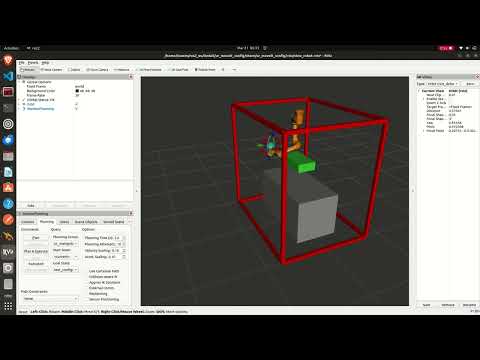
Collision avoidance pipeline running in Gazebo Ignition simulation with webcam mode. The green box tracks the human hand in real time — MoveIt2 replans around it automatically.
In traditional industrial environments, robots are separated from humans using physical safety cages. This project removes that barrier. A camera monitors the shared workspace, detects the human worker's hand using MediaPipe, and publishes a padded 3D collision box around it to MoveIt2 at 10Hz. The UR5e robot treats this box as a live obstacle and automatically replans around it in real time.
The result is a robot that can share a workspace with a human worker safely — stopping and replanning whenever the human's hand enters the robot's intended path, and resuming normal operation the moment the hand moves away.
Webcam / Kinect Camera (RGB + Depth)
              |
              v
  C++ MediaPipe Hand Tracking Node
  (30 FPS, publishes 21 landmarks)
              |
              v
     /hand_landmarks/hand_0
              |
              v
   hand_to_collision.py (ROS2, 10Hz)
   - Builds padded 3D bounding box
   - Constrained to table surface
   - Atomic remove+add (no ghost boxes)
              |
              v
      /planning_scene topic
              |
              v
    MoveIt2 Motion Planner
    - Treats hand box as obstacle
    - Replans trajectory around it
              |
              v
         UR5e Robot Arm
- Real-time hand detection at 30 FPS using a custom C++ MediaPipe node
- Live collision avoidance — MoveIt2 replans around the hand box at 10Hz
- Atomic scene updates — old box and new box swap in one message, no ghost boxes
- Table-constrained collision box — box is clamped to the table's physical boundaries
- Dual mode operation — WEBCAM_MODE for development, Kinect mode for deployment
- Gazebo Ignition simulation — full lab environment with inverted UR5e, table, and frame
- Single-command launcher — entire 4-terminal pipeline starts with one command
The simulation runs in Gazebo Ignition (Fortress) with a custom lab description matching the real physical setup:
- UR5e mounted inverted on a ceiling frame (matching real lab configuration)
- Aluminium frame structure (2.0m × 1.5m × 1.88m)
- Work table (1.4m × 0.7m × 0.71m) centered below the robot
- Full MoveIt2 integration with
joint_state_broadcasterandjoint_trajectory_controller - RViz with live PlanningScene display showing the green hand collision box
The collision avoidance pipeline has been tested end-to-end in simulation:
- ✅ Hand detected in real time via webcam + MediaPipe at 30 FPS
- ✅ Collision box published to MoveIt2 at 10Hz — appears as green box in RViz
- ✅ Robot fails to plan when hand box is in the intended path
- ✅ Robot plans successfully the moment the hand is removed
- ✅ Consistent on/off behaviour confirmed across multiple test runs
| Component | Status |
|---|---|
| C++ MediaPipe hand tracking node | ✅ Complete |
| hand_to_collision.py ROS2 node | ✅ Complete |
| Gazebo Ignition simulation (lab description) | ✅ Complete |
| MoveIt2 collision avoidance in simulation | ✅ Complete |
| Webcam testing mode | ✅ Complete |
| Single-command pipeline launcher | ✅ Complete |
| Kinect depth integration | 🔄 In Progress |
| Full end-to-end test on physical UR5e | ⏳ Pending |
This repo contains three folders that must each live directly in your home directory (~):
~/
├── mediapipe/
│   └── mediapipe/
│       └── examples/
│           └── hand_tracking_custom/
│               ├── hand_tracking.cpp
│               └── BUILD
│
├── ros2_ws/
│   ├── launch_hrc.sh                     # Launches the hand-tracking / planning pipeline
│   └── src/
│       ├── actions_py/                   # Package config (setup.py, package.xml, setup.cfg)
│       ├── cmake_pkg/                    # Package config (CMakeLists.txt, package.xml)
│       ├── human_robot_collab/           # hand_to_collision.py
│       ├── lab_robot_description/        # Custom URDF/xacro: inverted UR5e + table + frame
│       │
│       │   # ── Cloned dependencies (not in this repo — see Installation) ──
│       ├── robotiq_description/          # Robotiq 2F-85 gripper
│       ├── Universal_Robots_Client_Library/
│       ├── Universal_Robots_ROS2_Description/
│       ├── Universal_Robots_ROS2_Driver/
│       └── Universal_Robots_ROS2_GazeboSimulation/
│
└── ir_project/                           # robot URDF/xacro + launch files
⚠️ The five packages marked Cloned dependencies are not included in this repo. You must clone them separately into~/ros2_ws/src/— exact commands are in the Installation section below.
- Ubuntu 22.04
- ROS2 Humble
- Gazebo Ignition Fortress (
ros-humble-ros-gz) - MoveIt2 (
ros-humble-moveit) - Bazel 7.4.1
- MediaPipe C++ (built in
~/mediapipe) - UR ROS2 packages (
ros-humble-ur)
1. Clone the repository:
git clone https://github.com/Ahmedhazemm29/Human-Robot-Collaboration---Industrial-Robotics-Project.git
cd Human-Robot-Collaboration---Industrial-Robotics-Project
git checkout master
2. Build the hand tracking node:
builtrack3. Build the ROS2 workspace:
cd ~/ros2_ws
colcon build
source ~/ros2_ws/install/setup.bashBefore starting the pipeline, launch the UR5e robot driver in a separate terminal:
ros2 launch ur_robot_driver ur_control.launch.py \
  ur_type:=ur5e \
  robot_ip:=192.168.1.102 \
  kinematics_params_file:="/home/hazem/ir_project/src/Universal_Robots_ROS2_Driver/ur_calibration/config/my_robot_calibration.yaml"
~/ros2_ws/launch_hrc.sh
This automatically opens 4 terminals in sequence:
| Terminal | What it runs |
|---|---|
| 1 | Gazebo Ignition + MoveIt2 + RViz (waits 20s for full init) |
| 2 | MediaPipe hand tracking node (handtrack) |
| 3 | Collision object publisher (hand_to_collision) |
| 4 | Planning scene monitor |
# Terminal 1 — Simulation
cd ~/ros2_ws
source /opt/ros/humble/setup.bash
source ~/ros2_ws/install/setup.bash
ros2 launch lab_robot_description lab_sim_moveit.launch.py

# Terminal 2 — Hand tracking
handtrack

# Terminal 3 — Collision publisher
source /opt/ros/humble/setup.bash
source ~/ros2_ws/install/setup.bash
ros2 run human_robot_collab hand_to_collision

# Terminal 4 — Monitor
source /opt/ros/humble/setup.bash
ros2 topic echo /planning_scene
Once RViz is open: Add → PlanningScene → OK to see the live green collision box.
| Terminal | Purpose |
|---|---|
| 1 | UR5e robot driver |
| 2–5 | launch_hrc.sh (hand tracking + MoveIt2 + collision pipeline) |
-
Ensure the
robot_ipmatches your actual UR5e configuration -
Use the correct calibration file for your specific robot
-
Start the robot driver before launching the pipeline
-
Verify controllers using:
ros2 control list_hardware_interfaces
At the top of src/hand_to_collision.py:
WEBCAM_MODE = True   # Development — uses webcam + fixed depth
WEBCAM_MODE = False # Deployment — uses Kinect depth stream + TF transform| Command | Description |
|---|---|
~/launch_hrc.sh |
Launch full pipeline with one command |
handtrack |
Run hand tracking node |
builtrack |
Rebuild hand tracking node after changes |
ros2 topic echo /planning_scene |
Monitor live collision box updates |
ros2 control list_hardware_interfaces |
Verify robot controllers are active |
| Layer | Technology |
|---|---|
| Hand detection | MediaPipe HandLandmarkTrackingCpu (C++, 30 FPS) |
| Robot middleware | ROS2 Humble |
| Motion planning | MoveIt2 |
| Simulation | Gazebo Ignition Fortress |
| Visualization | RViz2 |
| Depth sensing | Kinect |
| Robot | Universal Robots UR5e (6-DOF, 5kg payload) |
| Build system | Bazel 7.4.1 (C++), colcon (Python/ROS2) |
- Kinect depth integration and TF2 frame calibration
- Full end-to-end testing on physical UR5e
- Sorting task logic — robot autonomously sorts objects around detected hand zones
- Predictive human motion modeling
- Multi-hand tracking support
- Ahmed Hazem
- Mohab Khaled
- Ali Loay
- Maya Hossam
- Haya Ayman
- Habiba Gad
- Nour Ramy
- Nour Kamel
German International University — Industrial Robotics Course